Membuat Efek Live Gradasi di Form Delphi 7

West Borneo Blogger - Seperti pada artikel yang telah di posting oleh blog Tekno Borneo tentang “Cara Membuat Efek Gradasi di Delphi 7 Seperti Instagram”, maka artikel ini adalah pengembangan dari artikel tersebut.
Efek gradasi yang dihasilkan dari sebuah blok koding yang tertulis di blog tersebut, dapat manipulasi menjadi efek jenis lain. Adapun jenis efek gradasi ini penulis sebut sebagai Efek Live Gradasi.
Efek live Gradasi memungkinkan gradasi yang tampil pada form Delphi dapat berubah-ubah warnanya seiring perubahan waktu yang dihitung secara otomatis oleh komponen timer. Dengan kata lain efek ini layaknya seperti pada menu login aplikasi Instagram.

Berbicara tentang efek tampilan pada pembuatan program, artikel ini lebih merujuk kepada desain interface atau lebih akrab dikenal dengan sebutan GUI (Graphical User Interface). Adapun manfaat yang didapatkan saat membuat desain suatu program adalah bukan terhadap sistem program yang dibuat, namun lebih kepada User Experience (Pengalaman Pengguna saat menggunakan aplikasi yang dibuat).
Membuat Efek Live Gradasi di Form Delphi 7
Tujuan dari user interface design adalah membuat interaksi pengguna sesederhana dan seefisien mungkin, dalam hal mencapai tujuan pengguna-apa yang sering disebut pengguna desain yang berpusat. User interface design yang bagus memfasilitasi dan menyelesaikan tugas di tangan pengguna tanpa menarik perhatian yang tidak perlu pada dirinya sendiri. Desain grafis dapat dimanfaatkan untuk mendukung kegunaan. Proses desain harus menyeimbangkan fungsi teknis dan elemen visual (misalnya, model mental) untuk menciptakan sebuah sistem yang tidak hanya operasional saja tetapi juga bermanfaat serta dapat disesuaikan dengan kebutuhan pengguna.
Interface design terlibat dalam berbagai proyek dari sistem komputer, untuk mobil, untuk pesawat komersial; semua proyek-proyek ini pada dasarnya melibatkan banyak interaksi sama manusia, namun juga membutuhkan beberapa keterampilan yang unik dan pengetahuan. Akibatnya, desainer cenderung mengkhususkan diri pada jenis proyek tertentu dan memiliki kemampuan berpusat di sekitar keahlian mereka, apakah itu perancangan perangkat lunak, penelitian pengguna atau desain tampilan.[1]

Sebelum mencoba mempraktikkan tutorial ini, pastikan bahwa komputer pembaca telah terinstall aplikasi Delphi 7, kemudian cek compability Delphi yang pembaca gunakan. Hal ini agar saat pengerjaan, semua pekerjaan dapat dijalankan secara lancar tanpa adanya bug-bug yang dapat memperlambat proses pembuatan yang sebenarnya sangat mudah ini.


Langkah-langkah Dalam Membuat Efek Live Gradasi di Delphi 7

1. Buka aplikasi Delphi 7, kemudian buat project baru dengan nama “prjlive_gradasi_teknoborneo”. Caranya klik File – New – Klik Applcation hingga terbuka form baru.

2. Klik Form1 tersebut kemudian atur propertiesnya seperti tabel di bawah ini :
Properties
Value
Caption
Live Gradasi Tekno Borneo
Name
prjlive_gradasi_teknoborneo
WindowState
wsMaximized

3. Jangan lupa di Save terlebih dahulu dengan cara klik File – Save. Lakukan save data secara rutin agar project yang dibuat telah tersimpan walaupun terjadi hal-hal yang tidak diinginkan seperti crash, debug atau error program.

4. Tambahkan dua buah komponen Timer dengan cara pilih tab System pada Component Palette.
Membuat Efek Live Gradasi di Form Delphi 7

5. Atur properties timer 1 seperti tabel di bawah ini :
Properties
Value
Enabled
True
Interval
30
Name
tmrperubahan

6. Atur properties timer 2 seperti tabel di bawah ini :
Properties
Value
Enabled
False
Interval
30
Name
tmrdefault

7. Tambahkan sebuah variabel integer dengan nama nilai pada deklarasi global. Hal ini dimaksudkan agar nilai dari variabel tersebut dapat dipakai oleh kedua komponen timer. Caranya klik 2x pada form delphi – scroll keatas. Pembaca dapat melihat teks berwarna merah dibawah ini sebagai contoh.

unit Unit1;

interface

uses
  Windows, Messages, SysUtils, Variants, Classes, Graphics, Controls, Forms,
  Dialogs, ExtCtrls;

type
  Tprjlive_gradasi_teknoborneo = class(TForm)
    Timer1: TTimer;
    Timer2: TTimer;
    procedure FormCreate(Sender: TObject);
  private
    { Private declarations }
  public
    { Public declarations }
  end;

var
  prjlive_gradasi_teknoborneo: Tprjlive_gradasi_teknoborneo;
  nilai : integer;

implementation

8. Inisialisasi variabel nilai tersebut pada event form create, caranya adalah klik 2x pada form – Tulis koding seperti dibawah ini. Inisialisasi ini bertujuan untuk memberikan value = 0 pada variabel nilai.

procedure Tprjlive_gradasi_teknoborneo.FormCreate(Sender: TObject);
begin
     nilai  := 0;
end;
9. Kembali ke form, klik 2x pada komponen tmrperubahan – Lalu masukkan koding dibawah ini. Koding ini gunanya untuk membuat perubahan warna gradasi di form. Perubahan warna ini bersifat mutlak dari penulis, jika pembaca ingin membuat perubahan warna yang lain, maka pembaca dapat melakukan eksperimen sendiri. Jangan lupa, warna teks yang merah adalah koding yang dituliskan.

procedure Tprjlive_gradasi_teknoborneo.tmrperubahanTimer(Sender: TObject);
var Row, Ht: Word;
    IX: Integer;
begin
  //gradient abstract animation
  iX :=200 ;
  Ht:=(ClientHeight + 512) div 256;
    for Row := 0 to 512 do
    begin
    with Canvas do begin
    Brush.Color := RGB(Ix,nilai,230);
    FillRect(Rect(0, Row * Ht, ClientWidth, (Row + 1) * Ht));
    IX :=(IX-1);
    end;
  end;

  if (nilai >= 255) then
  begin
  tmrdefault.Enabled := True;
  tmrperubahan.Enabled := False;
  end
  else
  inc(nilai);
end;

10. Kembali lagi ke form, klik 2x pada tmrdefault – lalu tuliskan koding seperti dibawah ini. Koding ini bertujuan untuk mengembalikan gradasi form ke asalnya, kemudian jangan lupa teks berwarna merah adalah yang dituliskan.

procedure Tprjlive_gradasi_teknoborneo.tmrdefaultTimer(Sender: TObject);
var Row, Ht: Word;
    IX: Integer;
begin
  //gradient abstract animation
  iX :=200 ;
  Ht:=(ClientHeight + 512) div 256;
    for Row := 0 to 512 do
    begin
    with Canvas do begin
    Brush.Color := RGB(Ix,nilai,230);
    FillRect(Rect(0, Row * Ht, ClientWidth, (Row + 1) * Ht));
    IX :=(IX-1);
    end;
  end;

  if (nilai <= 0) then
  begin
  tmrdefault.Enabled := False;
  tmrperubahan.Enabled := True;
  end
  else
  dec(nilai);
end;

11. Terakhir jalankan aplikasi ini dengan cara klik icon Run atau tekan F9 pada keyboard.


Lanjut Membaca :

(Video Belum Tersedia)
Blog West Borneo Blogger tidak menyediakan project seperti gambar di atas untuk disebarkan, namun jika pembaca ingin, maka dapat menghubungi penulis dengan kontak yang telah tertera di akhir artikel atau masuk ke dalam menu Contact.

Follow blog ini jika ingin mendapatkan informasi yang lainnya. West Borneo Blogger #YourPartnerToBeAMaster.

My Contact :
Facebook : Rangga Saputra
Fanspage : Teknoborneocom
Instagram : @teknoborneo
HP/WA/Telegram : +628 988282 108


Referensi :
[1] https://defikristiana.wordpress.com/2016/02/11/antar-muka-pengguna-user-interface/
Baca selengkapnya

Design Modern User Interface Delphi 7, Beautiful, Cool and Attractive

West Borneo Blogger - Graphics User Interface (GUI) or Interface in the world of programming is absolutely necessary when building an application, especially in the appearance. Interface is used by the user (user) to feel the ease and convenience when interacting on the application made, this is called the "User Experience".
A good User Experience allows the user to experience a great experience when using an application created without any loss of focus on objects in the application form.
In designing the look of the application, the first thing to do is to design the application mockup by using the help of special software such as Balsemiq Mockup 3 and etc.
If less familiar, the author recommends readers to use other graphic design applications such as Adobe Photoshop, Illustrator, Corel or Microsoft Paint.

If the reader is a person who often updates about the design world, whether the reader is familiar with the term "Flat Design"? Yes, the design is booming at the launch of Microsoft Windows 10. This design is very distinctive, simple and elegant to be a modern design mecca today. This is supported by the rise of designers to competitors who adopted this design as User Interface Application.


Design Modern User Interface Delphi 7, Beautiful, Cool and Attractive
Also read: Windows 10 gets the best interface design award
According to the topic of discussion in this article, the author will share some knowledge about the example of Delphi 7 Application Special Interface Design 7. Before going deeper, you should read Delphi 7 or at least install and open this application.
A little explanation of Delphi 7, Delphi is a Windows-based programming language that provides visual application creation facilities such as Visual Basic. Delphi makes it easy to use program code, fast compilation, multiple unit file use for modular programming, software development, attractive design patterns and reinforced structured programming languages ​​in Object Pascal programming language. Delphi has a special look that supports a Delphi component scope of work to build an application using Visual Component Library (VCL). Most Delphi developers write and compile program code in the IDE (Integrated Development Environment).

With the various advantages listed above, it turns out there is a weakness that is on the program display. The classic view of the program makes it worth a minus if viewed from the side of the GUI, although it is still relative, meaning not all have that view.

The reader can see as shown below. The classic look makes things boring (sorry) when in view.
Design Modern User Interface Delphi 7, Beautiful, Cool and Attractive
How can a display like this can be published, used as Final Project or made Thesis?

For that, as shown in the blog Tekno Borneo that there are examples of design that can be used as a reference in building application programs in Delphi 7. Authors can create a GUI with a little plagiarism and modification by mimicking the appearance of applications that have been worldwide, such as Google products, Microsoft, Avast and others.

Here are three design models from blogs that use more modern display principles:

1. Opening Form or Splash Screen ala Microsoft Office

Design Modern User Interface Delphi 7, Beautiful, Cool and Attractive
Is the opening form as when you first run Microsoft Office 2016. Bubuhi short information in it such as the application name and Copyright applications.

2. Login form with Instagram background design.

Design Modern User Interface Delphi 7, Beautiful, Cool and Attractive
Delphi 7 form can also be made in graded color. Certainly using coding / instead of using images.

3. Form Menu with Metro UI design ala Windows 10

Design Modern User Interface Delphi 7, Beautiful, Cool and Attractive
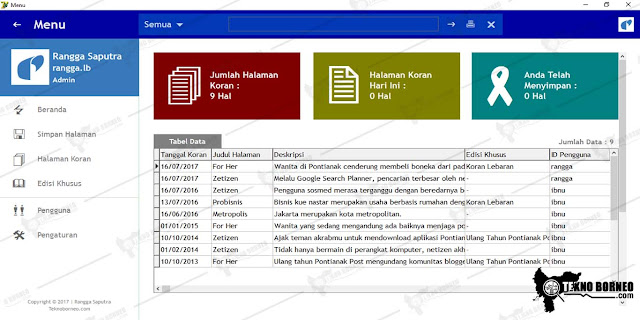
Interactive and dynamic designs can be utilized in building applications. By utilizing the empty space during the transition process on the UI Metro boxes, so the placement of other information such as images and text can be put to the maximum (not impressed slum).

4. Home Form with Modern design UI ala Android

Design Modern User Interface Delphi 7, Beautiful, Cool and Attractive
A little plagiarization and modification of the Google Keep GUI and Telegram Apps, making the new look more elegant.
Those are three examples of Interface designs that are expected to spoil the user when using the created application. Not only indulge but also get a plus from the User Experience side.
This article is not intended to judge, menjudge or maybe cut and lower the spirit of the reader in creating, because back again to the law of aesthetics, that the good appearance is relative. This means that some people say this is good but some people think this is bad. But be assured that the development of technology is always directly proportional to the development of the times, in other words if the classical has had a place in his time, then we as users who still play the classic objects in the current generation, can conjure it into something extraordinary or maybe more Good from what appears in the present generation.

Blog West Borneo Blogger does not provide readers to get projects like the picture above, but the author will guide the dear reader to make things (relatively) the same as above by posting related matters in the next article.


Follow this blog if you want to get more information. West Borneo Blogger - #YourPartnerTobeAMaster.

My Contact :
Facebook : Rangga Saputra
Fanspage : Teknoborneocom
Instagram : @teknoborneo
HP/WA/Telegram : +628 988282 108 (Indonesia)


Referensi :
Baca selengkapnya

Desain Tampilan Form Delphi 7 Modern, Cantik, Keren dan Menarik

West Borneo Blogger - Graphics User Interface (GUI) atau Antar Muka dalam dunia pemrograman merupakan hal yang mutlak diperlukan ketika membangun suatu aplikasi khususnya di bagian tampilannya. Antar Muka digunakan oleh user (pengguna) agar merasakan kemudahan dan kenyamanan saat berinteraksi diatas aplikasi yang dibuat, hal ini disebut dengan istilah "User Experience".
User Experience yang baik memungkinkan user merasakan pengalaman yang luar biasa saat menggunakan aplikasi yang dibuat tanpa adanya lost focus pada objek di form aplikasi.
Dalam merancang tampilan aplikasi, hal yang pertama dilakukan adalah dengan mendesain mockup aplikasi dengan menggunakan bantuan software khusus seperti Balsemiq Mockup 3 dan sejenisnya.
Jika kurang familiar, penulis merekomendasikan pembaca untuk menggunakan aplikasi desain grafis lain seperti Adobe Photoshop, Ilustrator, Corel ataupun Microsoft Paint.


Desain Tampilan Form Delphi 7 Modern, Cantik, Keren dan Menarik
Jika pembaca merupakan orang yang sering update tentang dunia desain, apakah pembaca sudah tidak asing lagi dengan istilah "Flat Desain"? Ya, desain yang booming saat peluncuran Microsoft Windows 10. Desain ini sangat khas, simpel dan elegan sehingga menjadi kiblat desain modern saat ini. Hal tersebut didukung oleh maraknya desainer hingga kompetitor yang mengadopsi desain ini sebagai User Interface Aplikasinya.
Baca juga : Windows 10 mendapat penghargaan desain interface terbaik
Sesuai topik bahasan di artikel kali ini, penulis akan membagikan sedikit ilmu tentang contoh Desain Antar Muka Aplikasi khusus Program Delphi 7. Sebelum masuk lebih dalam, sebaiknya pembaca pernah menggunakan Delphi 7 atau minimal pernah menginstall dan membuka aplikasi ini.
Sedikit penjelasan tentang Delphi 7, Delphi merupakan bahasa pemrograman berbasis Windows yang menyediakan fasilitas pembuatan aplikasi visual seperti Visual Basic. Delphi memberikan kemudahan dalam menggunakan kode program, kompilasi yang cepat, penggunaan file unit ganda untuk pemrograman modular, pengembangan perangkat lunak, pola desain yang menarik serta diperkuat dengan bahasa pemrograman yang terstruktur dalam bahasa pemrograman Object Pascal. Delphi memiliki tampilan khusus yang didukung suatu lingkup kerja komponen Delphi untuk membangun suatu aplikasi dengan menggunakan Visual Component Library (VCL). Sebagian besar pengembang Delphi menuliskan dan mengkompilasi kode program dalam IDE (Integrated Development Environment).

Dengan berbagai kelebihan yang tertera di atas, ternyata terdapat kelemahan yaitu pada bagian tampilan program. Tampilan program yang cenderung masih klasik membuatnya mendapatkan nilai minus jika dipandang dari sisi GUI, walaupun hal tersebut masih bersifat relatif, artinya tidak semua berpandangan demikian.

Pembaca dapat lihat seperti gambar di bawah ini. Tampilan yang klasik menjadikan hal yang membosankan (mohon maaf) saat di pandang.
Desain Tampilan Form Delphi 7 Modern, Cantik, Keren dan Menarik
Bagaimana mungkin tampilan yang seperti ini dapat dipublish, dijadikan Tugas Akhir atau dibuat Skripsi?

Untuk itu, seperti yang tertera di blog Tekno Borneo bahwa terdapat contoh desain yang dapat dijadikan sebagai referensi dalam membangun program aplikasi di Delphi 7. Penulis dapat membuat GUI dengan sedikit plagiasi dan modifikasi dengan meniru tampilan aplikasi yang sudah mendunia, seperti produk-produk Google, Microsoft, Avast dan lain sebagainya.

Berikut ini tiga model desain dari blog yang menggunakan prinsip tampilan lebih modern :

1. Form Pembukaan atau Splash Screen ala Microsoft Office

Desain Tampilan Form Delphi 7 Modern, Cantik, Keren dan Menarik
Merupakan form pembuka seperti saat pertama kali menjalankan Microsoft Office 2016. Bubuhi short information di dalamnya seperti nama aplikasi dan Copyright aplikasi.

2. Form Login dengan desain background ala instagram.

Desain Tampilan Form Delphi 7 Modern, Cantik, Keren dan Menarik
Form Delphi 7 juga dapat dibuat dengan warna bergradasi. Pastinya menggunakan coding/bukan menggunakan gambar.

3. Form Menu dengan desain Metro UI ala Windows 10

Desain Tampilan Form Delphi 7 Modern, Cantik, Keren dan Menarik
Desain interaktif dan dinamis dapat dimanfaatkan dalam membangun aplikasi. Dengan memanfaatkan ruang kosong saat proses transisi pada kotak-kotak Metro UI, sehingga penempatan informasi lain seperti gambar dan teks dapat diletakkan secara maksimal (tidak terkesan kumuh).

4. Form Beranda dengan desain Modern UI ala Android

Desain Tampilan Form Delphi 7 Modern, Cantik, Keren dan Menarik
Sedikit plagiasi dan modifikasi GUI Google Keep dan Telegram Apps, membuat tampilan baru yang lebih elegan.
Itulah tiga buah contoh desain Antar Muka yang diharapkan dapat memanjakan pengguna saat menggunakan aplikasi yang dibuat. Tidak hanya memanjakan namun juga mendapatkan nilai plus dari sisi User Experience.
Artikel ini bukan bertujuan untuk menghakimi, menjudge atau mungkin memotong dan menurunkan semangat pembaca dalam berkreasi, karena balik lagi kepada hukum estetika, bahwasanya tampilan yang bagus itu bersifat relatif. Artinya ada orang yang bilang ini bagus namun ada juga yang beranggapan ini buruk. Namun yakinlah bahwasanya perkembangan teknologi selalu berbanding lurus dengan perkembangan zaman, dengan kata lain jika yang klasik telah memiliki tempat di masanya, maka kita selaku pengguna yang masih memainkan benda klasik tersebut di generasi saat ini, dapat menyulap itu menjadi hal yang luar biasa atau mungkin lebih bagus dari yang muncul di generasi sekarang.

Blog West Borneo Blogger tidak menyediakan pembaca untuk mendapatkan project seperti gambar di atas, namun penulis akan memandu pembaca yang budiman untuk membuat hal yang (relatif) sama seperti di atas dengan memposting hal-hal terkait pada artikel berikutnya.

Lanjut Membaca :
1. Desain Programku Tidak Seklasik Desain Miliknya >> (Artikel Dasar di Blog Tekno Borneo)
2. Membuat Efek Live Gradasi di Form Delphi 7 >> Artikel Selanjutnya

Follow blog ini jika ingin mendapatkan informasi lebih lanjut. West Borneo Blogger - #YourPartnerTobeAMaster.

My Contact :
Facebook : Rangga Saputra
Fanspage : Teknoborneocom
Instagram : @teknoborneo
HP/WA/Telegram : +628 988282 108


Referensi :
http://www.teknoborneo.com/2017/08/desain-program-delphiku-tidak-seklasik.html
Baca selengkapnya

What is Data Types in Computer Programming language, Example and References

What is Data Type / Data Type?

What is Data Types in Computer Programming language, Example and References
West Borneo Blogger - Data Type is a type of value that can be accommodated by a variable.

Types of Data Type / Data Type

1. Primitive data type (Simplified)

Primitive data types are data types that can store one value per one variable. Primitive data types are the basic data types that are often used by programs. Examples of primitive data types are numeric type (integer and real), character data type / char, boolean data type.
1.1. Numeric
The numeric data type is used in variables or constants to store values ??in numeric form. This data type is divided into integers, and real.
1.1.1. Integer
Integer Is a data type in the form of integers, divided into several categories such as table below.
Data Type
Size
Value Range
Byte
1 byte
0 s/d +255
Shortint 
1 byte
-28 s/d +127
Integer
2 bytes
-32768 s/d 32767
Word 
2 bytes
0 s/d 65535
Longint 
4 bytes
2147483648 s/d 2147483647

1.1.2. Real
Real is a number that contains a decimal point or a fractional type.
Data Type
Size
Value Range
real
6 bytes
2.9 x 10-39 s/d 1.7 x1038
single
4 bytes
1.5 x 1045 s/d 3.4 x 1038
double
8 bytes
5.0 x 10-324 s/d 1.7 x 10308
extended
10 bytes
3.4 x 10-4932 s/d 1.1 x 104932
comp
8 bytes
-9.2x 10¹⁸ s/d 9.2x 10¹⁸

1.2. Character (char)
Characters are data types that are only able to store 1 digit of characters. The size for the character data type is 1 byte (1 byte = 8 bits). There are 256 character types that are character-coded (ASCII), 0 to 255. For character writing using single quotes (') in front and back of written characters. Examples: 'a', 'A', '&' etc.
Values? that include characters are:
A. Character letters: 'a' .. 'z', 'A' .. 'Z'
B. Character number: '0' .. '9'
C. Character punctuation: point, comma, semicolon, colon and so on
D. Special characters: $,%, #, @ and so on.

1.3. Boolean
Boolean is a logical data type, which contains two possible values: TRUE (true) or FALSE (false). Boolean data types use the smallest memory.

2. Composite data type

Composite Data Type is a data type that can hold many values, among others, as follows.
2.1. Array
Arrays or commonly referred to as arrays, are well-structured data types, though still simple. An array is capable of storing a number of data of the same type (homogeneous) in a variable. As an illustration, the array can hold a lot of data but with the same data type, such as integers only. Each location of the array data is given an index number that serves as the address of the data.

2.2. Record or struct
Like Arrays, Records or Structs also include composite data types. Records are known in Pascal / Delphi while Structs are known in C ++. In contrast to arrays, data record types are able to hold large amounts of data with different data types (heterogeneous). For example, an integer part, one more character, and another Boolean part. Usually the record is used to accommodate the data of an object. For example, students have a name, address, age, place of birth, and date of birth. The name will use the string data type, the address of the data type string, the age of the type of data single (numeric), the birthplace of the data type string, and date of birth data type date. Here is an example of using records in Delphi.

2..3. Image
Image, or image, or image, is a graph data type. For example graphs of the development of the number of students SMK, photos of our families, travel videos, and others. In modern programming languages, especially visual based, this data type has been supported very well.

2.4. Date Time
The data values ??for the date and time are internally stored in a specific format. Variables or constants declared with Date data type can be used to store both date and time. This type of data belongs to a group of composite data types, because it is the formation of several data types.

2.5. Object
The object data type is used to store values ??associated with objects provided by Visual Basic, Delphi, and other GUI-based programming languages. For example, if you have a form that has a Command button control, we name it Command1.

2.6. Subrange
Data type subrange is a data type of number that has a certain range of values ??in accordance with the established programmer. Typically, this data type has a minimum value and maximum limit value. This data type is very well supported in Delphi.

2.7. Enumeration
This data type is a data type that has elements that must be called one by one, and is worth of integer constants in the order. The value of the integer constants of this element is represented by a variable name written in parentheses. This data type is also found in Delphi, and declarative programming languages ??such as SQL.

In the example above, the data type Hari_dlm_Minggu includes enumeration with the Zero range range, which is Monday to Sunday and the data value from 0, 1, up to 7. While data type Nama_Bulan includes enumeration with Zero range range, January to December and data value From 0, 1, up to 12.

Other Data Types
1. Structured Data Type
1.1. Data String Type
It is a data that stores arrays, for example 'ABCDEF' is a string constant containing 6 bytes of characters. Place size for this data type is 2 to 256 bytes, with the number of elements 1 to 255.
1.2. Data Set Type
A set is a set of values ??(members). Set is a Data type specific to Pascal. The set in programming is very similar to the set in mathematical sciences.
One of the benefits of using a data set type is to check whether a value appears within a certain range. For example, to determine whether a character is a Lower Case Letter (ie, lower case), eg. Ch is a Char type, we can write, if (Ch> = 'a') and (Ch <= 'z') then Writeln (Ch, 'is lowercase.'); Or, with the set notation, we can write, if Ch in ['a' .. 'z'] then Writeln (Ch, 'is lowercase.');

2. Data Type Pointer
Pointer is a special variable that contains an address (address) in another location in memory. A variable that points (points) to something so called a pointer.
There are two kinds of pointers:
A) Typed (specific): is a pointer that points to a particular data type on a variable.
B) Generic (general): is a pointer that does not point to a particular data type on a variable.

Baca selengkapnya